Evaluating the Watercolor Peony Floral Repeat Pattern for Professional Design Projects
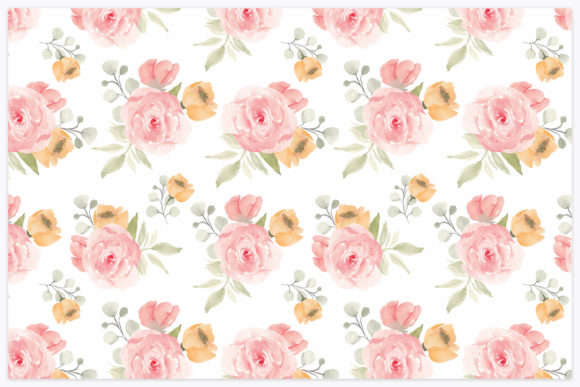
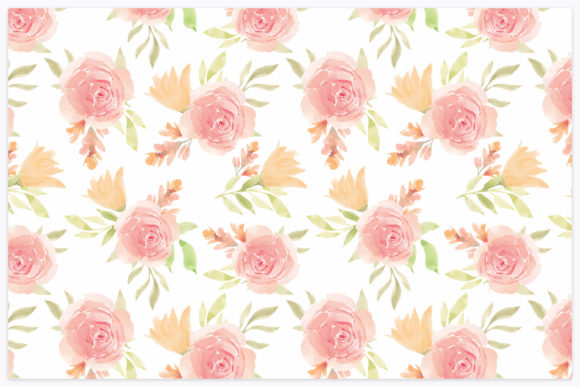
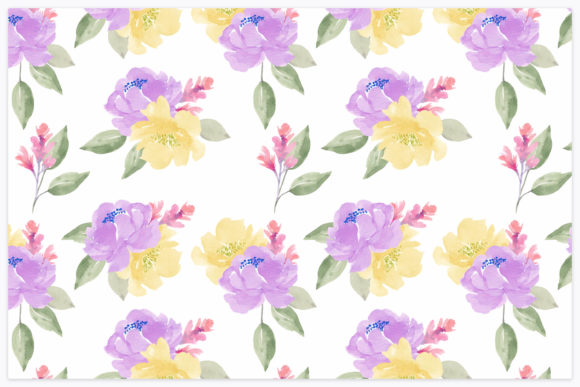
Selecting the right surface pattern is often the most critical decision in a textile or print design project. The aesthetic must align with the brand identity, but the technical specifications determine whether the asset is actually usable in production. When evaluating a Watercolor Peony Floral Repeat Pattern, designers and product developers are typically balancing two distinct needs: the organic, hand-painted appeal of traditional botanical art and the rigorous technical requirements of modern digital printing. This specific category of seamless pattern bridges that gap, offering the softness of watercolor media within a structured, tileable format suitable for commercial application.
Understanding what distinguishes this specific type of floral repeat from generic botanical assets requires looking at both the artistic style and the file architecture. A true watercolor peony pattern is not merely a photograph of flowers arranged in a grid; it is a digitally constructed composition where individual painted elements are layered to create depth without visible seams. The peony, with its complex petal structure and voluminous form, presents unique challenges in seamless tiling that simpler florals do not face. Evaluating this resource involves assessing how well those challenges have been met and whether the included formats support your specific workflow.
Technical Specifications and Format Utility
The practical value of any digital pattern lies in its deliverables. For this Watercolor Peony Floral Repeat Pattern, the inclusion of both .EPS 10 and high-resolution .JPG formats addresses different stages of the design pipeline. Understanding when to use each is essential for maintaining quality across various applications, from web previews to large-format fabric printing.
The Role of the EPS 10 Vector Format
The .EPS 10 file is the industry standard for editable surface patterns. While watercolor textures themselves are raster-based (pixel), the arrangement of the peonies within the repeat is typically vector-defined in this format. This distinction matters significantly for professional users:
- Scalability: You can resize the entire pattern scale up or down without losing the alignment of the repeat. This is crucial when adapting a single design for both small stationery items and large home decor textiles.
- Color Editing: Global color swatches in EPS format allow for rapid recoloring. If a client requests a shift from summer pinks to autumnal rusts, the base watercolor texture remains intact while the hue adjustments are applied non-destructively.
- Element Manipulation: Individual peonies and foliage can be moved, rotated, or hidden to create derivative patterns without repainting the original artwork.
However, users should note that EPS 10 is an older version of the Encapsulated PostScript standard. While this ensures broad compatibility with legacy systems and various RIP software used in textile manufacturing, it may lack support for newer transparency effects found in modern Illustrator files. Always test the file in your specific production environment before committing to bulk printing.
High-Resolution JPG Capabilities
The included 4167 x 4167 pixel JPG serves as the immediate-use asset. At this resolution, the file supports approximately 13.8 inches of print area at 300 DPI, which is the standard benchmark for high-quality commercial printing. This size is particularly relevant for:
- Digital Proofing: Sending quick mockups to clients who do not have vector editing software.
- Web and Social Media: Creating seamless backgrounds for websites or Instagram templates where file weight needs to be managed.
- Stationery Design: Greeting cards, wedding invitations, and packaging wraps often fall well within the dimensions provided by this resolution.
When comparing this resolution to alternatives, be aware that some budget marketplaces offer patterns at only 2000 pixels. While sufficient for screen use, those smaller files often result in pixelation when printed on fabric. The 4167px specification here places the asset in the professional tier, suitable for most POD (Print on Demand) services and boutique textile runs.
Comparative Analysis: Watercolor Peonies vs. Alternative Florals
Choosing a peony-centric watercolor pattern over other floral styles involves tradeoffs in visual weight, seasonality, and technical complexity. An informed selection process weighs these factors against project goals.
Visual Weight and Negative Space
Peonies are inherently dense flowers. Unlike daisies or wildflowers, which rely heavily on negative space to define their shape, peonies occupy significant canvas area. In a seamless repeat, this creates a lush, maximalist effect that reads as luxurious and established. However, this density can be a limitation for projects requiring subtlety or text overlay.
If your design requires substantial copy—such as a blog header, a quote card, or a product label background—a dense Watercolor Peony Floral Repeat Pattern may compete with the typography. In such cases, a scattered wildflower pattern or a tone-on-tone damask might offer better legibility. Conversely, for products where the pattern is the primary feature (e.g., duvet covers, shower curtains, or wrapping paper), the visual density of the peony is an advantage, providing complete coverage without needing additional graphical elements.
Seasonality and Market Positioning
Watercolor peonies carry strong seasonal associations, typically linked to late spring and summer holidays. This makes them ideal for Mother’s Day, bridal showers, and summer wedding collections. When researching ideas for Q3 or Q4 products, however, consider whether the specific color palette of the pattern can transcend this association. A blush pink peony is distinctly summery; a deep burgundy or dusty blue peony rendered in watercolor can transition into fall and winter markets. Evaluating the color temperature alongside the floral species prevents inventory from becoming seasonally obsolete.
Hand-Painted vs. AI-Generated Alternatives
The current market includes both traditionally digitized watercolor patterns and AI-generated florals. Traditional watercolor peony patterns, like the one described here, possess authentic pigment variation, paper grain texture, and natural bleeding edges that AI often struggles to replicate consistently across a seamless tile. AI patterns may exhibit anatomical errors in petal structure or repetitive artifacts at the seam lines.
For high-end branding where authenticity and copyright clarity are paramount, verified hand-painted or professionally composited watercolor assets remain the safer choice. AI alternatives may be faster and cheaper, but they currently lack the nuanced imperfection that defines the watercolor aesthetic. If your audience values artisanal quality, the human element in the brushwork is a tangible differentiator.
Best-Fit Scenarios and Practical Applications
Determining whether this specific asset fits your workflow depends on matching its strengths to your output medium. Based on the technical specs and aesthetic profile, here is where this pattern performs best versus where caution is advised.
Ideal Use Cases
- Fabric and Textile Design: The combination of EPS editability and high-res JPG makes this suitable for fashion, quilting cotton, and home textiles. The watercolor texture prints beautifully on natural fibers like linen and cotton, where the ink absorption mimics actual watercolor paper.
- Summer Holiday Templates: Pre-designed templates for events often require backgrounds that feel festive yet elegant. The soft edges of watercolor peonies provide visual interest without the harshness of vector clip art, making them superior for sophisticated event stationery.
- Wallpapers and Murals: Because the EPS allows for rescaling, this pattern can be adjusted to fit wall dimensions. Watercolor florals are trending in interior design for creating accent walls that feel less rigid than geometric repeats.
- Packaging and Branding: Beauty, skincare, and wellness brands frequently utilize peony imagery to convey femininity and natural ingredients. The seamless nature allows for flexible box wrapping and bag designs.
Limitations and Decision Factors
Despite its versatility, this pattern type has constraints. Users working exclusively in raster programs like Photoshop will not benefit from the vector editability of the EPS and must rely solely on the 4167px JPG. While high resolution, this fixed size limits scaling for billboard or large-format signage without upscaling artifacts. Additionally, watercolor patterns generally do not reproduce well on glossy, synthetic substrates where the ink sits on top of the surface rather than absorbing; the matte, papery quality of the art style clashes with high-shine plastics.
Furthermore, if your project demands strict Pantone matching, watercolor gradients present a challenge. The soft transitions between wet and dry pigment areas are simulated in CMYK or RGB. Converting these to spot colors for screen printing requires significant prepress work to separate the tonal values. For simple spot-color applications, a flat vector floral may be more cost-effective and technically appropriate.
Making the Final Selection
When comparing this Watercolor Peony Floral Repeat Pattern against other options in your library or marketplace, prioritize technical adequacy alongside aesthetic preference. Verify that the 4167px resolution meets your largest intended print size at 300 DPI. Confirm that your software supports EPS 10 if you intend to modify the layout. Consider whether the density of the peony motif supports or hinders your specific application.
Ultimately, the value of this resource lies in its dual-format delivery and the timeless appeal of the subject matter. It serves as a robust foundation for summer-themed commercial projects, provided the user understands the interplay between the organic art style and the technical demands of their chosen medium. By weighing these practical factors against creative vision, designers can confidently integrate this seamless floral asset into professional workflows, ensuring the final product looks as intentional in print as it does on screen.